Lightroom for Linux? RapidOne
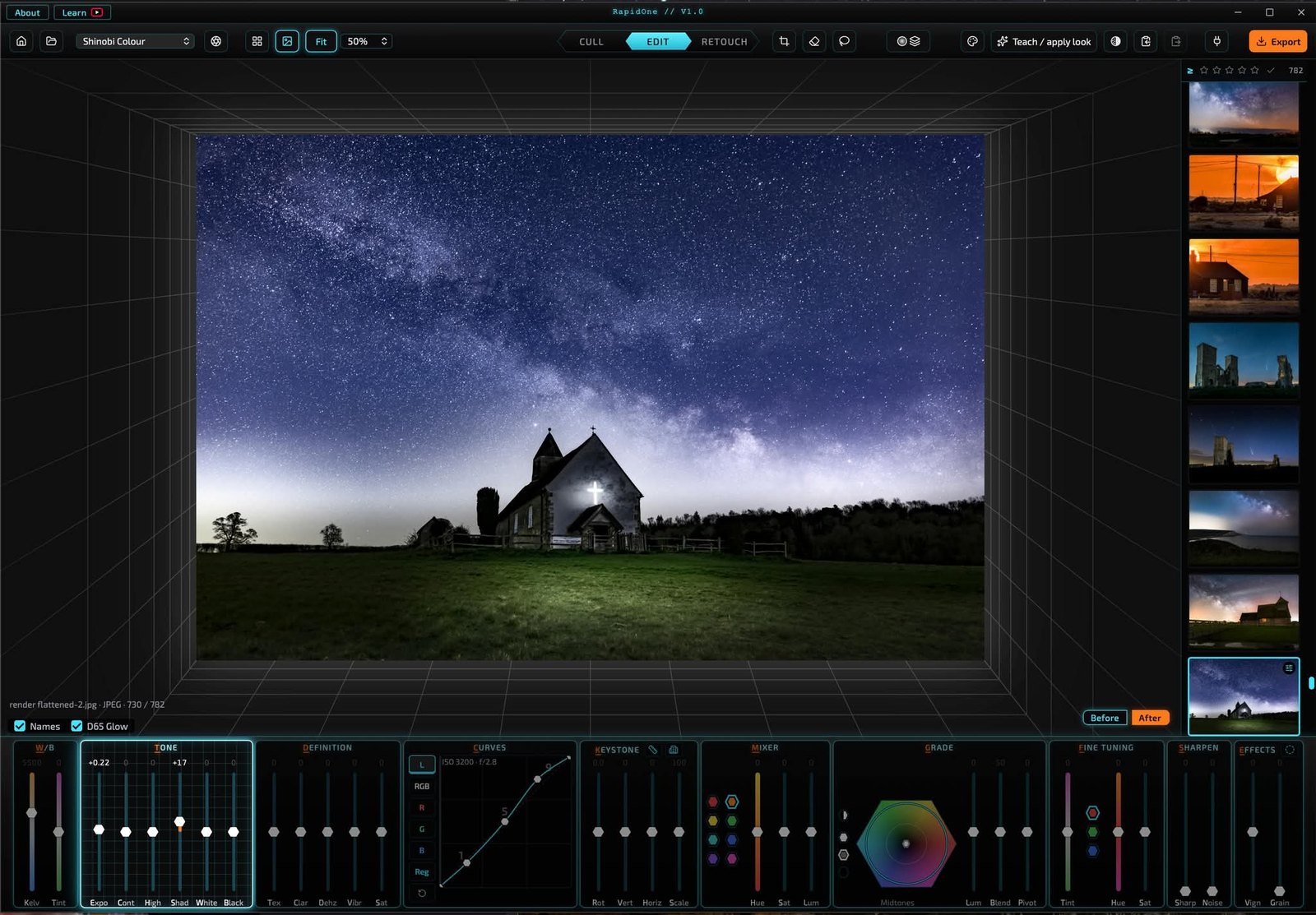
Adobe has never made Lightroom for Linux. If you’ve moved to Linux Mint, Ubuntu or another Linux system and still edit RAW photos, that’s usually the first thing that stops you. I hit the same wall, so I built RapidOne: a RAW editor that runs natively on Linux, as well as Windows and Mac.
As I like to put it: this isn’t a free alternative to Lightroom, it’s a better alternative to Lightroom that just happens to be free.
Watch RapidOne in action
The video shows RapidOne culling, editing and retouching a real shoot, so you can see how it compares with Lightroom before you install anything. The rest of the RapidOne playlist goes into each tool in more depth.
Can you run Lightroom on Linux?
Not properly. There’s no Linux version of Adobe Lightroom or Lightroom Classic, so most people either keep a Windows or Mac computer just for editing, or look for a Linux alternative.
When I first went looking, I reviewed RapidRAW, an open-source editor that showed how good a modern Linux RAW editor could be. It got me thinking about what I’d want from one myself, and that became RapidOne.
Why RapidOne is a great Lightroom alternative
- It reads your Lightroom edits. RapidOne opens Lightroom and Aftershoot XMP files, including crops and gradients, and can use Adobe’s camera profiles if you add your own, so your existing edits come with you.
- Fast, on your graphics card. Editing, zooming and exporting run on your graphics card, with the processor as a fallback.
- Familiar editing tools. White balance (with an eyedropper), exposure, contrast, highlights, shadows, whites and blacks, texture, clarity, dehaze, vibrance and saturation, tone curves, a colour mixer, colour grading wheels, sharpening, defringe, vignette and grain.
- Masks. Automatic subject masks, plus brush, linear and radial masks you can combine and invert.
- It learns your style. Show it photos you’ve already edited and it learns your white balance, exposure and look, then edits a whole shoot evenly in that style, like Aftershoot. Presets, copy and paste, and before and after too.
- Remove and repair. Erase an object by drawing round it, painting over it or naming it, or use Photoshop-style heal and clone.
- Noise reduction. Colour noise reduction is on by default for RAW files, and AI Denoise cleans up high-ISO photos, one at a time or every photo above an ISO you choose.
- Lens corrections, crop and straighten, with auto level and keystone.
- Export to JPEG or 16-bit TIFF, full size or scaled, with export presets.
Edits are non-destructive, so your RAW files are never changed.
Cull, edit and retouch in one app
Lightroom only edits. RapidOne has three tabs working on the same folder of photos:
- Cull: pick and rate a shoot quickly, with near-duplicates grouped together. You can cull from your phone’s browser on the same Wi-Fi, or with the RapidCull Android app, which downloads a folder so you can cull offline and syncs your picks back.
- Edit: RapidOne’s own RAW engine, with everything above.
- Retouch: AI portrait retouching for skin, blemishes, wrinkles, eyes, teeth, backdrops and dodge and burn, as simple sliders, like Evoto.
Free, private and no subscription
RapidOne is free and open source. Everything runs on your own computer, so your photos are never uploaded and there’s no account to make. I’m developing it actively, so expect regular updates.
Download RapidOne for Linux
RapidOne runs on Linux Mint 22, Ubuntu 24.04 or newer, Pop!_OS, Fedora, Debian, Arch and most other recent 64-bit Linux systems. It’s also available for Windows 10 and 11, and for Apple Silicon Macs on macOS 13 or later, plus RapidCull for Android phones.
Go to the RapidOne download page
On Linux Mint, Ubuntu and Pop!_OS, choose the .deb file and open it to install. On other Linux systems, choose the AppImage. The download page has step-by-step install help.
Read more about everything RapidOne does on the RapidOne page.